Hi there,
October brought a batch of updates to the tools at Sammartano.Science. Two of them change how you use every simulation, and many of the visualizations were improved and updated, with some new content as well!
Annotations. You can now draw, highlight, and label directly on top of any sim. Pause a simulation, circle the part you want students to notice, add a note, and keep going. It works well for walking through a model on a projector or for students marking up what they see before they explain it.
Screenshots and recordings. Every sim now has built-in capture. Take a screenshot with your annotations included, or record a short clip of the sim running. That means you can drop a clean image into a slide, a lab report, or a Schoology post, or save a clip to replay later without screen recording software.
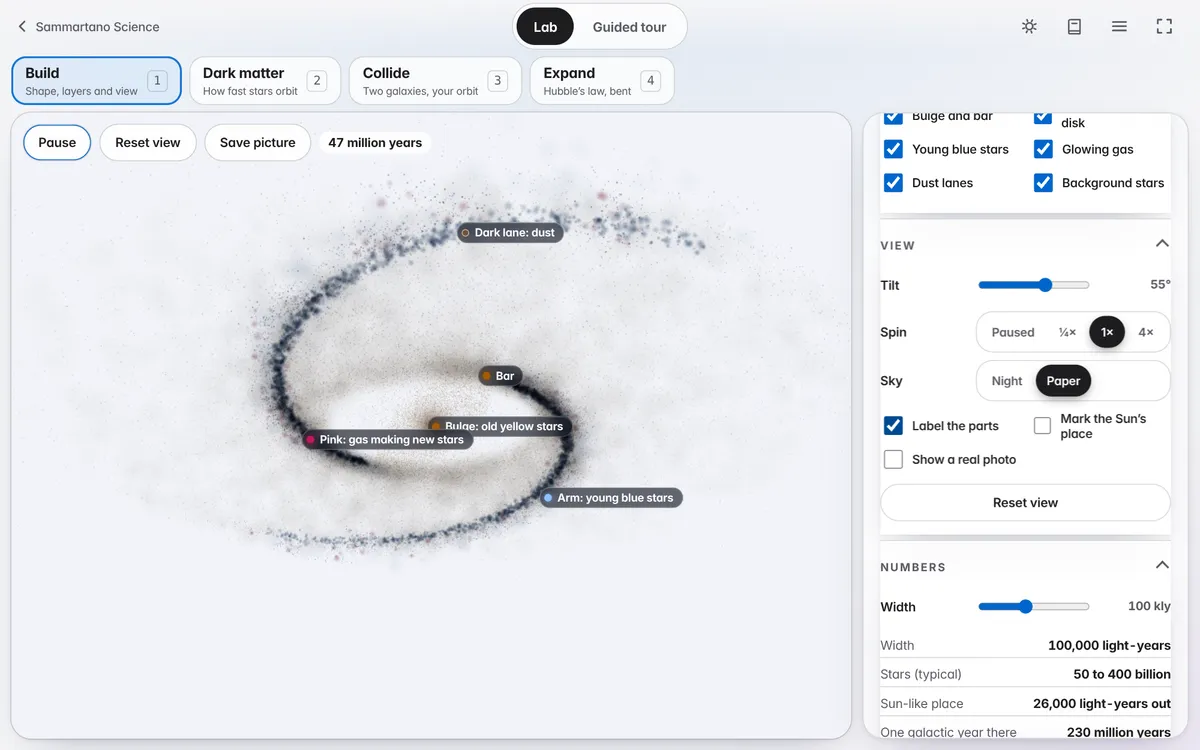
Galaxies. The galaxy sim is the biggest rebuild this month. You can set up a galaxy, change how it is shaped and how it spins, and watch what happens to the stars over time. It is a good one for showing why galaxies look the way they do and how scientists use shape to sort them. Pair it with annotations and you can point out structure as it forms.
Greenhouse. The greenhouse sim is rebuilt and easier to read. You can change the amount of greenhouse gas and see how much heat the atmosphere holds, and the controls now make it clear which change caused which result. It is built for the question students always ask: how does a gas in the air change the temperature at the ground?
Other sims also got smoother controls and clearer labels, so if you used one earlier this year, it is worth another look.
Everything is free and runs in a browser, with nothing to install. If you try something in class and it works, or breaks, reply and tell me. Most of these updates started as a note from a teacher.
Thanks for reading,
Mike